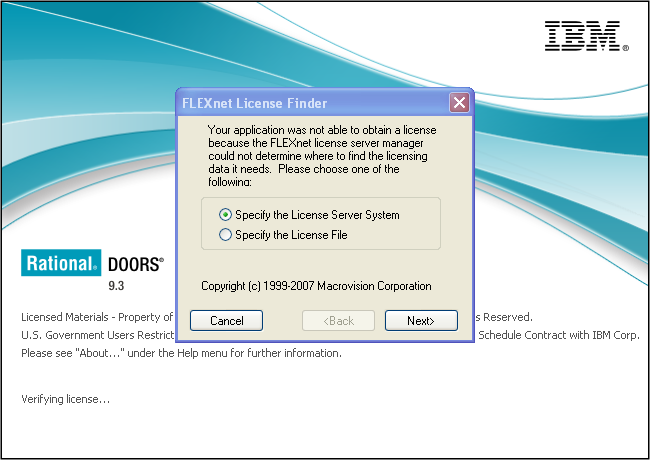
Hello, I have a batch job which starts DOORS and runs some DXL every hour. IT take the Licence Server down late every night and have it up sometime early in the morning. When it is down the "FLEXnet Licence Finder" window appears and needs 'Cancel' clicked. The batch waits while the window is open, until I arrive in the morning and cancel it. Is there a way to silently fail and return to the batch if the licence server is down? -Adam Adamarla - Fri Feb 21 01:44:37 EST 2014 |
Re: Silently fail when Licence Server is down
You need to: Run the following code:
Compare that to this:
Or better yet:
Having said that, "printing" in Batch is a no-no since it leaves DOORS running until in the morning you close the black DOS command box with the printed messages. You may thus want to change "print" to some kind of "saveBatchErrorMessage" to some file. Lets not forget about "acknowlege", "errorBox", "infoBox", "warningBox", "confirm", "query"; all of which have two flavors (with or without a parent "DB"), and "confirm" has 4 flavors. -Louie |
Re: Silently fail when Licence Server is down llandale - Fri Feb 21 12:47:57 EST 2014
You need to: Run the following code:
Compare that to this:
Or better yet:
Having said that, "printing" in Batch is a no-no since it leaves DOORS running until in the morning you close the black DOS command box with the printed messages. You may thus want to change "print" to some kind of "saveBatchErrorMessage" to some file. Lets not forget about "acknowlege", "errorBox", "infoBox", "warningBox", "confirm", "query"; all of which have two flavors (with or without a parent "DB"), and "confirm" has 4 flavors. -Louie The icon on the display box will likely indicate which perm; a red "X" means "errorBox", a yellow Triangle means "warningBox", a blue circle (with "!") means "ack" or "infoBox" (blue circle with question mark is "query"). Here are the 4 defined "severity" constants:
int msgQuery // Severity for messageBox() -Louie |
Re: Silently fail when Licence Server is down llandale - Fri Feb 21 12:47:57 EST 2014
You need to: Run the following code:
Compare that to this:
Or better yet:
Having said that, "printing" in Batch is a no-no since it leaves DOORS running until in the morning you close the black DOS command box with the printed messages. You may thus want to change "print" to some kind of "saveBatchErrorMessage" to some file. Lets not forget about "acknowlege", "errorBox", "infoBox", "warningBox", "confirm", "query"; all of which have two flavors (with or without a parent "DB"), and "confirm" has 4 flavors. -Louie I well understand how to repurpose a function, but it is not a simple dxl modal box. It looks like a normal dxl DB, but I am not convinced it is running as 'interpreted' dxl. It is the error you get when there is no licence, so I guess it is runs as soon as DOORS starts, before any custom dxl is executed. I have checked if the -C dxl runs before it, but it doesn't. I searched for the "Verifying licence..." splash message, but didn't find that either. Thanks, Adam Attachments Licence.PNG |
Re: Silently fail when Licence Server is down I just realised I can test if the server is available in the batch file:
set
DOORSSERVER=the.doors.server

ping -n 1 %DOORSSERVER% | find "TTL" >NUL: 2>NUL:
if errorlevel 1 (
    echo DOORS Unavailable
) else (
    echo DOORS Available
)
There's a bit of a race condition doing it this way, but probably good enough. -Adam EDIT: Line 1 and 2 should be on one line, but the post gets changed when I save it!? |
Re: Silently fail when Licence Server is down Adamarla - Mon Feb 24 08:39:48 EST 2014 I just realised I can test if the server is available in the batch file:
set
DOORSSERVER=the.doors.server

ping -n 1 %DOORSSERVER% | find "TTL" >NUL: 2>NUL:
if errorlevel 1 (
    echo DOORS Unavailable
) else (
    echo DOORS Available
)
There's a bit of a race condition doing it this way, but probably good enough. -Adam EDIT: Line 1 and 2 should be on one line, but the post gets changed when I save it!? Or do this:
if not exist "\\the.doors.server\" (
    echo DOORS Unavailable
) else (
        echo DOORS Available, run batch
)
|